
Nano Learning in Online Training: Formats That Drive Performance
Nano Learning Toolkit: The Ultimate Guide to Modern Microlearning Formats
Video, audio, quizzes, scenarios, and job aids that create impact in under two minutes, for retail teams who learn in real life.
Nano learning is not “short content.” It is precision training designed to be applied immediately, often in under two minutes. In retail, that constraint is a strategic advantage: it forces you to focus on one behavior, one phrase, one detail, one decision. It also matches the way store teams actually learn: between clients, during a quick back-of-house moment, before opening, after lunch, or on the commute.
The biggest mistake brands make is treating nano learning like a single format, usually “make a quick video.” Video is powerful, but it is not always the best tool for the job. A two-minute learning goal can require comparison, recall, tone practice, decision-making, or an on-the-spot reference. If everything becomes video, three things happen: fatigue increases, production slows down, and updates become harder than they should be.
The better approach is a format toolkit. Penceo’s own framing already points in that direction by listing multiple nano learning formats such as short videos, infographics, and flashcards. If you expand that into a full 2026 toolkit, you get a system that is faster to produce, easier to update, and more relevant to store reality. Your teams stop “taking training” and start using training as support.
Choose formats by objective
Video patterns that win
Audio as invisible coaching
Quizzes and interactive widgets
Branching scenarios in micro format
Job aids and in-the-moment cards

1: Choose formats by objective
Not everything should be a video.
The fastest way to improve nano learning results is to stop asking “What content should we create?” and start asking “What behavior should change tomorrow?” Once you have the behavior, the format becomes obvious.
Penceo lists multiple nano learning formats, including short videos, infographics, and flashcards, which supports the core idea: variety is a feature, not a compromise. In retail, different objectives require different media.
A simple objective-to-format map:
Video for gestures, demonstrations, and service posture.
Infographics for comparisons and clarity (materials, size differences, line architecture).
Flashcards for rapid recall (features, vocabulary, price anchors).
Audio for tone, rhythm, and storytelling phrasing.
Quizzes for reinforcement and retrieval (check understanding fast).
How to choose correctly, in 20 seconds:
If it must be seen, use video or a visual card.
If it must be compared, use an infographic or swipe comparison.
If it must be recalled fast, use flashcards and mini quizzes.
If it must sound right, use audio.
If it must prevent mistakes immediately, use job aids.
If it requires judgment, use a scenario or dilemma.
Key production rule: do not overproduce. Nano learning is built to be repeated and updated. If you spend cinema-level effort on content that will expire after one season, you will slow the whole machine.
Build a reusable template family (video, card, quiz) to keep quality consistent.
Keep one objective per asset, no exceptions.
Build a “do not translate” list and a glossary for brand vocabulary.
Add one action line at the end, “Try this today”.
Make the asset searchable and easy to favorite.
The toolkit mindset prevents video fatigue and protects speed. It also makes nano learning more relevant because each objective is delivered in the medium that best matches how people understand and remember it.
2: Video patterns that win
Make it short, specific, and repeatable.
Video is the most emotionally powerful nano format because it can transmit more than information: gesture, calm, tempo, posture, and the “luxury feel” of service. But in retail, video fails when it becomes a lecture. Your team does not need a talking head explaining a product for three minutes. They need a demonstration they can replay.
High-performance nano videos blueprint:
One shot, one action, one takeaway.
Split features into a series rather than one long video.
Use subtitles by default (stores are noisy, people watch silently).
Show real products, real hands, real environments.
Keep a consistent visual signature (your Maison’s internal media language).
Add one practice question at the end.
3 nano video templates that work in luxury and fashion retail:
The “One Detail Spotlight”
Purpose: teach one detail that increases perceived value.
Structure: show detail, name it, link it to benefit, give a client phrase.The “Ceremony”
Purpose: teach one ritual step (handover, packaging, aftercare cue).
Structure: show step, show timing, show what not to do, one phrase.The “Objection Snap”
Purpose: teach one objection handling pattern.
Structure: objection, pause, answer, check question, next step.
Creative direction rules:
Keep lighting consistent with brand tone (calm, soft, high clarity).
Keep background clean; product must be the hero.
Use minimal text overlays: only the key phrase or key number.
Keep cuts slow enough to understand hand movements.
Avoid hype language; retail luxury training should feel confident and restrained.
Build a consistent intro/outro that doesn’t waste time (2 seconds, max).
The best retail training video is not a lecture. It is a demonstration plus a prompt to act, designed for replay until the behavior becomes natural.
3: Audio as “invisible coaching”
The underrated format for retail.
Audio is one of the most underused nano learning formats in corporate training, and one of the most useful for retail. Why? Because it trains what often matters most in premium service: tone, rhythm, and confidence. It also works when the screen cannot.
Audio shines in four retail contexts:
back-of-house tasks (hands busy)
Morning briefing, pre-shift preparation
Voice examples for tone and phrasing.
Inclusive accessibility option for visual fatigue.
Audio formats that work in 2026:
The “One Phrase, Three Ways” (45 seconds)
Same message delivered in three tones: neutral, premium, warm.The “Objection Script + Pause” (60 to 90 seconds)
The pause is part of luxury. Teach silence as a tool, not as awkwardness.The “Story Hook” (30 seconds)
A micro story opener that advisors can use, followed by one bridge question.The “Pronunciation Card” (20 seconds)
Heritage terms, product line names, founder references. Quick repeat loop.
How to produce audio without making it boring:
Use one consistent voice identity per language (a “Maison voice”).
Add one clear action prompt at the end.
Provide transcript text for quick scanning and accessibility.
Use audio as reinforcement, not as first exposure for complex topics.
Audio supports repetition without screen time. That makes it ideal for instalearning rhythms, especially for phrases, storytelling, and objection handling where tone is the skill.
4: Quizzes and interactive widgets
Turn passive learning into decisions.
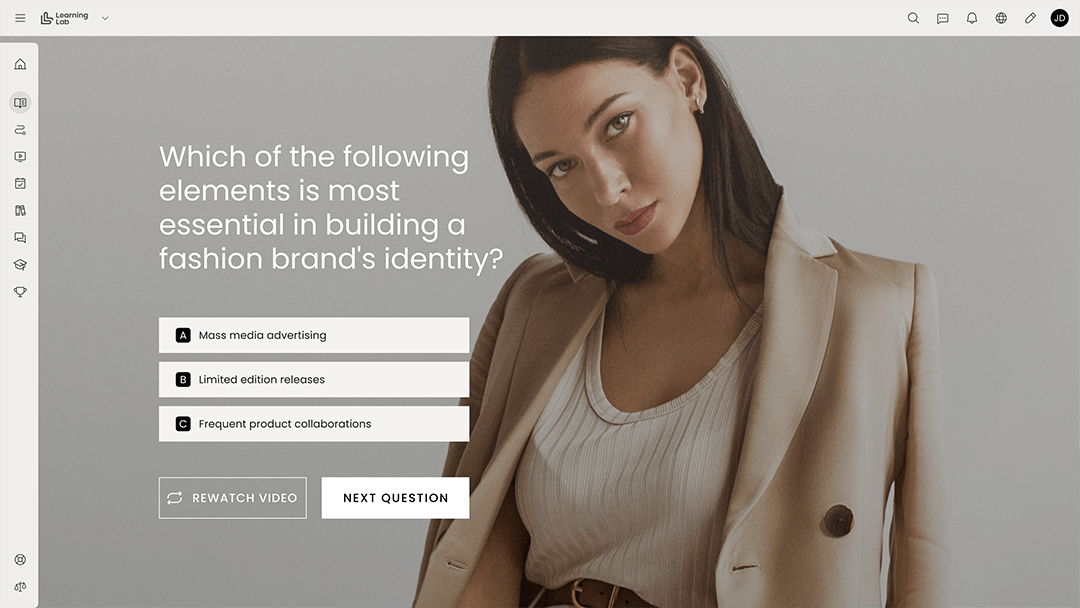
In nano learning, quizzes are not “tests.” They are learning events. A two-minute module without interaction is often a confidence illusion: people feel like they understood because they watched. Interaction forces retrieval and reveals gaps fast.
Two-choice dilemmas.
Product comparison drag-and-drop.
Hotspot identification on product visuals.
Timed challenges for launch weeks.
Instant feedback that teaches, not judges.
The key is designing quizzes as decisions, not trivia.
Five widget patterns that work on the shop floor:
Two-choice dilemma (10 seconds)
Example: client asks for discount. Choose the response that protects brand tone.Phrase completion (15 seconds)
Example: complete the closing line to keep it polite and confident.Product match (20 seconds)
Example: match material to benefit or collection to client need.Visual hotspot (15 seconds)
Example: identify the feature on the product image. Keep targets large and clear.Confidence check (5 seconds)
“How confident are you?” Route to a refresher or a more advanced scenario.
Feedback design rules:
Explain why the best answer is best.
Explain the risk of the wrong answer in human terms (client trust, elegance, clarity).
Keep feedback short enough to read.
Allow immediate retry.
Avoid shaming language.
Use the Maison vocabulary consistently.
Interactivity is the fastest way to force retrieval and reduce illusions of understanding. When learners must decide, they build the judgment that clients actually feel.
5: Branching scenarios in micro format
Mini simulations for selling ceremony.
Many brands assume scenarios require 15 minutes and a complex branching engine. In reality, retail judgment can be trained in micro scenarios under three minutes, if you keep the structure tight.
One client goal, one constraint, one decision.
Show consequences quickly.
Repeat the same skill across different client types.
Use it to practice objections and upsell moments.
Add manager debrief prompts.
The micro scenario recipe:
Context (20 seconds)
Where are we? Who is the client? What is the mood?Goal (20 seconds)
What does the advisor need to achieve now?Decision (20 seconds)
Choose one of two or three responses.Consequence (20 seconds)
Show what happens: client warms up, client shuts down, client questions expertise.Upgrade (20 seconds)
Offer the better alternative and the reason.Apply (20 seconds)
“One line to try today” plus a debrief question for managers.
Micro scenario examples:
The client wants to compare online pricing.
The client is hesitant about care and durability.
The client is buying a gift under time pressure.
The client signals high status but low patience.
The client asks “What’s the difference between these two lines?”
The client says “I’ll think about it” after a strong proposal.
Manager debrief prompts:
“What did you hear in the client’s words that mattered?”
“What would you change in your tone?”
“What is your bridge question after the answer?”
Scenarios are where microlearning becomes sales confidence. They teach judgment, not just information, which is why they translate so well to the selling ceremony.
6: Job aids and “in-the-moment” cards
Support beats memory.
The most practical nano format is also the least glamorous: job aids. They often create the biggest performance lift because they reduce errors in real time and reduce stress.
Job aids are not “cheat sheets.” They are operational design: you decide which information should be remembered and which should be supported.
Quick reference for sizes, materials, aftercare.
Script cards for greeting and closing.
Policy reminder cards for returns and warranties.
Job aid design rules:
One screen when possible to avoid scrolling.
Use icons and short labels.
Make it searchable with common retail terms, not internal codes.
Date-stamp policies and sensitive rules.
Archive old ones.
High-impact job aids in luxury and fashion:
“Objection quick replies” (value, availability, comparison, returns).
“VIC appointment checklist” (pre, during, after).
“Aftercare essentials” (care instructions, repair process, reassurance phrases).
“Collection map” (how lines relate, what to propose next).
“Brand vocabulary” (signature terms, terms to avoid, pronunciation).
Job aids reduce stress and errors. They transform the learning program into daily support, which is exactly what retail teams value most when the store is busy.

Nano learning becomes powerful when it becomes a toolkit
A content strategy that keeps staff supported, confident, and on-brand.
Nano learning wins because it is compatible with reality. In a few minutes, you can teach one move that improves the next client interaction. But the real upgrade is not making more short videos. It is building a format toolkit and choosing the best format for each objective, so content stays fresh, fast to update, and easy to repeat.
Recap of the six toolkit pillars:
Choose formats by objective, not by habit. Penceo already signals this by listing multiple nano formats such as video, infographics, and flashcards.
Use video for what must be seen: gestures, posture, handling, ritual.
Use audio for what must sound right: tone, rhythm, phrasing, calm authority.
Use quizzes and widgets to force retrieval and train decisions quickly.
Use micro scenarios to build judgment inside the selling ceremony.
Use job aids to support performance in the moment and reduce errors.
A toolkit approach only works if production is consistent and fast. That is where Penceo’s creative L&D profile becomes a practical advantage: creative direction that respects the Maison’s identity, scripting that stays focused on one objective, premium video and motion design, interactive widget design that teaches rather than entertains, and content governance that keeps assets current and trusted. When those pieces come together, nano learning stops being “small content” and becomes what it should be in 2026: a daily support system that store teams choose to use because it helps them win on the floor.
